


Phani Puttabakula - Jun 02, 2026
Embedding sAP ABAP in Your Go Applications: The ABAPer SDK
SAP’s ABAP Development Tools (ADT) exposes a REST API for nearly every development operation — reading source code, creating objects, activating, running unit tests, syntax checking. But that API is verbose XML over HTTP, requires specific content-type negotiation, and has dozens of edge cases around CSRF tokens, session handling, and activation callbacks.
The ABAPer Go SDK (github.com/bluefunda/abaper) wraps all of that into a clean, interface-driven Go library. You import it, create a client, and call methods. The HTTP complexity stays invisible.
This guide walks through the SDK from installation to a complete CI/CD workflow.
Use Cases
Before diving into code, here are the scenarios where the SDK pays for itself:
CI/CD pipelines: Pull source from a Git repository, push it to a SAP development system, activate, run unit tests, and report results — all without a GUI or a human in the loop.
Custom tooling: Build deployment scripts that respect transport dependencies, roll back activations on test failure, or compare object versions across systems.
IDE integration: The SDK ships a full LSP server (lsp package). If you are building an editor plugin or a language server wrapper, you can embed the LSP server directly rather than shelling out to a subprocess.
Monitoring and reporting: Query object metadata, package contents, and transport history programmatically to feed dashboards or compliance reports.
Installation
The SDK requires Go 1.25.1 or later.
go get github.com/bluefunda/abaperFor just the ADT client (without the CLI dependencies):
go get github.com/bluefunda/abaper/lib
go get github.com/bluefunda/abaper/types
Import in your code:
import (
    "github.com/bluefunda/abaper/lib"
    "github.com/bluefunda/abaper/types"
)
Creating the ADT Client
The entry point is lib.CreateADTClient. It takes the SAP hostname, client number, username, and password, and returns an types.ADTClient interface.
package main

import (
    "fmt"
    "log"

    "github.com/bluefunda/abaper/lib"
)

func main() {
    client, err := lib.CreateADTClient(
        "https://dev.sap.company.com", // host
        "100",                          // SAP client number
        "DEVELOPER",                    // username
        "secret",                       // password
    )
    if err != nil {
        log.Fatalf("failed to create ADT client: %v", err)
    }

    fmt.Println("ADT client ready")
    _ = client
}
CreateADTClient establishes the HTTP session, negotiates the CSRF token, and validates connectivity. It returns an error if the host is unreachable or credentials are rejected — you do not need a separate ping step.
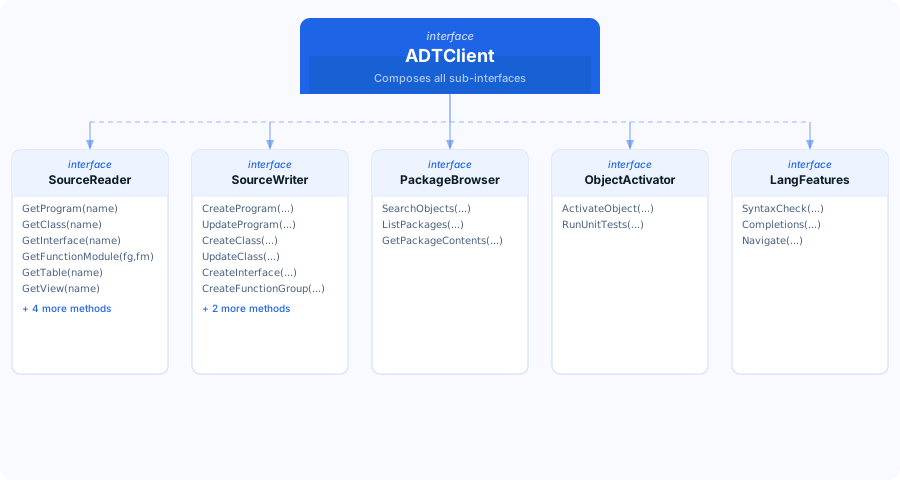
The returned client satisfies the types.ADTClient interface, which composes several focused sub-interfaces. You can assign it to a narrower interface type if you want to restrict what a function can do:
func readSource(reader types.SourceReader, programName string) (string, error) {
    return reader.GetProgram(programName)
}
Interface Hierarchy
The SDK interface hierarchy is designed around the principle of interface segregation: each interface covers a cohesive group of operations, and ADTClient composes all of them.
Reading ABAP Source
SourceReader provides typed getters for each ABAP object type. All methods return the source as a plain string.
// Read a program
source, err := client.GetProgram("ZMYREPORT")
if err != nil {
    return fmt.Errorf("GetProgram: %w", err)
}
fmt.Println(source)

// Read a class (returns the class pool source)
classSource, err := client.GetClass("ZCL_FINANCE_POSTING")
if err != nil {
    return fmt.Errorf("GetClass: %w", err)
}

// Read an interface
intfSource, err := client.GetInterface("ZIF_PAYMENT_PROCESSOR")
if err != nil {
    return fmt.Errorf("GetInterface: %w", err)
}

// Read a function module (requires function group name)
fmSource, err := client.GetFunctionModule("ZMATERIAL_FM", "ZMATERIAL_READ")
if err != nil {
    return fmt.Errorf("GetFunctionModule: %w", err)
}
Reading source is the foundation for several automation patterns: backing up ABAP objects to Git, diffing source between transport steps, and feeding source into AI analysis pipelines.
Backing Up a Package to Git
func backupPackage(client types.ADTClient, pkg string, outputDir string) error {
    objects, err := client.GetPackageContents(pkg)
    if err != nil {
        return fmt.Errorf("list package: %w", err)
    }

    for _, obj := range objects {
        var source string
        var err error

        switch obj.Type {
        case "PROG":
            source, err = client.GetProgram(obj.Name)
        case "CLAS":
            source, err = client.GetClass(obj.Name)
        case "INTF":
            source, err = client.GetInterface(obj.Name)
        default:
            continue
        }

        if err != nil {
            return fmt.Errorf("read %s %s: %w", obj.Type, obj.Name, err)
        }

        filename := filepath.Join(outputDir, obj.Name+".abap")
        if err := os.WriteFile(filename, []byte(source), 0644); err != nil {
            return fmt.Errorf("write file: %w", err)
        }
    }
    return nil
}
Creating Objects
SourceWriter handles object creation and source updates. Creating a new ABAP program requires a name, a package, and optionally an initial source string.
// Create a new program
err := client.CreateProgram(
    "ZNEWREPORT",    // program name
    "ZFINANCE",      // package
    `REPORT ZNEWREPORT.
WRITE 'Hello from ABAPer SDK'.`,
)
if err != nil {
    return fmt.Errorf("CreateProgram: %w", err)
}

// Update source of an existing program
newSource := `REPORT ZNEWREPORT.
DATA: lv_amount TYPE p DECIMALS 2.
lv_amount = 100.
WRITE lv_amount.`

err = client.UpdateProgram("ZNEWREPORT", newSource)
if err != nil {
    return fmt.Errorf("UpdateProgram: %w", err)
}
Creating a Class with Interface Implementation
// Create the interface first
err := client.CreateInterface("ZIF_CALCULATOR", "ZMATH")
if err != nil && !errors.Is(err, types.ErrAlreadyExists) {
    return fmt.Errorf("CreateInterface: %w", err)
}

// Create the implementing class
err = client.CreateClass("ZCL_SIMPLE_CALC", "ZMATH", `
CLASS zcl_simple_calc DEFINITION
  PUBLIC
  CREATE PUBLIC.

  PUBLIC SECTION.
    INTERFACES zif_calculator.
ENDCLASS.

CLASS zcl_simple_calc IMPLEMENTATION.
ENDCLASS.
`)
if err != nil {
    return fmt.Errorf("CreateClass: %w", err)
}
Activating and Testing
Activation is a separate step from writing source — this mirrors how SAP ADT works. After writing or updating source, you must activate the object before changes take effect.
// Activate a program
err := client.ActivateObject("ZNEWREPORT", "PROG")
if err != nil {
    return fmt.Errorf("ActivateObject: %w", err)
}

// Activate a class
err = client.ActivateObject("ZCL_SIMPLE_CALC", "CLAS")
if err != nil {
    return fmt.Errorf("ActivateObject: %w", err)
}
Running Unit Tests
results, err := client.RunUnitTests("ZCL_FINANCE_POSTING", "CLAS")
if err != nil {
    return fmt.Errorf("RunUnitTests: %w", err)
}

fmt.Printf("Tests run: %d\n", results.Total)
fmt.Printf("Passed:    %d\n", results.Passed)
fmt.Printf("Failed:    %d\n", results.Failed)

for _, failure := range results.Failures {
    fmt.Printf("FAIL: %s.%s — %s\n",
        failure.TestClass,
        failure.TestMethod,
        failure.Message,
    )
}

if results.Failed > 0 {
    return fmt.Errorf("%d unit test(s) failed", results.Failed)
}
Full Deploy-Activate-Test Pipeline
func deployAndTest(client types.ADTClient, name, objectType, source string) error {
    // 1. Write source
    switch objectType {
    case "PROG":
        if err := client.UpdateProgram(name, source); err != nil {
            return fmt.Errorf("update source: %w", err)
        }
    case "CLAS":
        if err := client.UpdateClass(name, source); err != nil {
            return fmt.Errorf("update source: %w", err)
        }
    }

    // 2. Syntax check before activating
    diagnostics, err := client.SyntaxCheck(source)
    if err != nil {
        return fmt.Errorf("syntax check: %w", err)
    }
    for _, d := range diagnostics {
        if d.Severity == "error" {
            return fmt.Errorf("syntax error at line %d: %s", d.Line, d.Message)
        }
    }

    // 3. Activate
    if err := client.ActivateObject(name, objectType); err != nil {
        return fmt.Errorf("activate: %w", err)
    }

    // 4. Run unit tests
    results, err := client.RunUnitTests(name, objectType)
    if err != nil {
        return fmt.Errorf("unit tests: %w", err)
    }
    if results.Failed > 0 {
        return fmt.Errorf("%d unit test(s) failed", results.Failed)
    }

    return nil
}
Searching Objects
PackageBrowser.SearchObjects queries the ABAP repository with a wildcard pattern and an optional type filter.
// Find all custom classes
objects, err := client.SearchObjects("ZCL_*", "CLAS")
if err != nil {
    return fmt.Errorf("search: %w", err)
}

for _, obj := range objects {
    fmt.Printf("%-30s %-6s %-20s %s\n",
        obj.Name,
        obj.Type,
        obj.Package,
        obj.Description,
    )
}

// Find objects by partial name, any type
all, err := client.SearchObjects("*MATERIAL*", "")
if err != nil {
    return fmt.Errorf("search: %w", err)
}
fmt.Printf("Found %d objects matching *MATERIAL*\n", len(all))
Embedding the LSP Server
The lsp package exposes a Language Server Protocol implementation that you can embed directly into any Go application. This is how the ABAPer VS Code extension and the Zed editor extension use it.
import "github.com/bluefunda/abaper/lsp"

// Create a server with the ADT backend (requires live SAP)
server := lsp.NewServer(lsp.Config{
    Backend: lsp.ADTBackend,
    Host:    "https://dev.sap.company.com",
    Client:  "100",
    User:    "DEVELOPER",
    Pass:    "secret",
})

// Run as stdio LSP (for editor plugins)
if err := server.RunStdio(); err != nil {
    log.Fatalf("LSP server: %v", err)
}
// Run as TCP server (for remote or multi-client setups)
server := lsp.NewServer(lsp.Config{
Backend: lsp.HybridBackend, // ADT + abaplint fallback
Host: "https://dev.sap.company.com",
Client: "100",
User: "DEVELOPER",
Pass: "secret",
})
if err := server.RunTCP(":2087"); err != nil {
log.Fatalf("LSP TCP server: %v", err)
}The three available backends are:
| Backend | Description |
|---|---|
OfflineBackend |
abaplint only. No SAP required. Works without network. |
ADTBackend |
Direct SAP ADT. Full feature set, requires connectivity. |
HybridBackend |
ADT with abaplint fallback when SAP is unreachable. |
For editor plugin development, HybridBackend is the right default — it gives users syntax checking even when they are not connected to SAP, and upgrades to full ADT features when they are.
Error Handling Patterns
The SDK uses standard Go error wrapping. All errors include context about which operation failed. The types package defines sentinel errors for common conditions:
import "github.com/bluefunda/abaper/types"

source, err := client.GetProgram("ZDOESNOTEXIST")
if err != nil {
    if errors.Is(err, types.ErrNotFound) {
        // Object does not exist — create it
        err = client.CreateProgram("ZDOESNOTEXIST", "ZTEMP", "REPORT ZDOESNOTEXIST.")
    } else if errors.Is(err, types.ErrUnauthorized) {
        // Credentials expired or insufficient authorization
        return fmt.Errorf("authorization error: %w", err)
    } else {
        // Unexpected error — log and propagate
        return fmt.Errorf("GetProgram: %w", err)
    }
}
For bulk operations, collect errors rather than stopping at the first failure:
var errs []error
for _, name := range programNames {
    if err := client.ActivateObject(name, "PROG"); err != nil {
        errs = append(errs, fmt.Errorf("activate %s: %w", name, err))
    }
}
if len(errs) > 0 {
    return errors.Join(errs...)
}
Getting Started
The SDK is open source under Apache 2.0.
go get github.com/bluefunda/abaper- GitHub: github.com/bluefunda/abaper
- Go package docs: pkg.go.dev/github.com/bluefunda/abaper
- CLI install:
brew install --cask abaperor the one-line installer
If you build something with the SDK — a CI pipeline, a custom IDE integration, a deployment tool — we’d like to hear about it. Open an issue on GitHub or reach out at bluefunda.com.
Ready to transform your SAP experience?
Join thousands of developers using BlueFunda AI tools.