


Phani Puttabakula - May 30, 2026
Building a Terminal AI Assistant for ABAP: Inside ABAPer’s Bubble Tea TUI
Most ABAP tooling lives in a browser: SAP GUI, the web-based ADT in Eclipse, the VS Code extension with its webview panels. That is fine when you have a monitor, a mouse, and a stable connection to your SAP backend. It is not fine when you are on a train, SSH’d into a jump host, or in the middle of a CI pipeline trying to debug a transport that broke at 11pm.
ABAPer v1.6.0 introduced a Bubble Tea-based terminal UI — a full interactive environment that runs entirely in your terminal. v1.7.0 extended it with system management forms. This post explains why we built it, what the technology stack looks like, and how the architecture holds together.
The Problem with Web-Only ABAP Tools
ABAP developers have always been power users of the command line for everything except ABAP itself. They use git for dotfiles, tmux for session management, and shell scripts for everything from data migrations to transport automation. But for the actual ABAP development loop — write, syntax check, activate, test — they have always had to context-switch to a GUI.
The context switch is expensive. Not just in seconds, but in mental state. The terminal is a focused, distraction-free environment. A browser is not.
There is also a connectivity argument. The ABAPer CLI already worked offline for some operations (the Go SDK’s OfflineBackend can run abaplint syntax checks without a SAP connection). But the AI chat feature — one of ABAPer’s most-used capabilities — was only available through the web editor at abaper.bluefunda.com. A TUI brings that capability to the terminal, including offline AI interaction for use cases that do not require a live SAP connection.
Technology Stack
The TUI is built on three Go libraries that have become the de facto standard for high-quality terminal applications:
Bubble Tea v1.3 — The application framework. Bubble Tea implements the Elm Architecture (Model-Update-View) in Go. You define a Model struct, a pure Update function that handles messages, and a View function that renders the current model to a string. Bubble Tea’s runtime manages the event loop, terminal raw mode, and resize events.
Lipgloss v1.1 — The styling library. Lipgloss provides a CSS-like API for terminal styling: borders, padding, margins, colors, alignment, and responsive layout. In the TUI, Lipgloss is responsible for every border you see, the color scheme, the chat bubble differentiation between user and assistant messages, and the responsive column layout that adjusts to terminal width.
Glamour v1.0 — Markdown rendering. AI responses often contain code blocks, lists, and inline formatting. Glamour converts Markdown to styled terminal output, including syntax-highlighted code blocks. This means that when the AI assistant returns a code sample or a structured analysis, it renders with proper formatting rather than as raw Markdown syntax.
Launching the TUI
The TUI is the default experience when you run abaper with no subcommand:
abaperThat’s it. No flags, no subcommand. If you want the traditional CLI help output, use abaper --help.
The TUI requires an authenticated session (run abaper login first) but does not require an active SAP system — you can open it and chat with the AI about ABAP code without any SAP connectivity.
What the TUI Looks Like
+------------------------------------------------------------+
| ABAPer v1.7.1  dev(100)  DEVELOPER  [Connected]            |
+--[ Chat ]--------------------------------------------------+
|                                                            |
|  You:                                                      |
|  > Review ABAP class for S/4 compatibility                 |
|                                                            |
|  Assistant: Found 3 S/4HANA issues:                        |
|                                                            |
|    SELECT BYPASSING BUFFER  -- deprecated in S/4HANA       |
|    MOVE-CORRESPONDING       -- use VALUE #( ) instead      |
|    SELECT * FROM MARA       -- must specify field list     |
|                                                            |
+--[ Input ]-------------------------------------------------+
|  > _                                                       |
|  [Enter] Send   [/] Commands   [Ctrl+C] Quit               |
+------------------------------------------------------------+
The layout has three zones: a status bar at the top (active system, user, connectivity), a scrollable chat history in the middle, and an input bar at the bottom. On wider terminals, a sidebar panel appears with the object browser.
TUI Features
Streaming AI Chat
Messages are streamed token-by-token from the AI backend. The TUI uses Bubble Tea’s cmd system to pump tokens from the streaming HTTP response into the model as discrete messages, so the UI updates incrementally as the response arrives rather than waiting for completion. This keeps the interface responsive even during long AI responses.
Markdown Rendering with Glamour
Every AI response is passed through Glamour before display. This means code blocks get syntax highlighting, headers render with visual weight, and bullet lists are properly formatted. For ABAP developers, this matters because the AI frequently returns ABAP code samples as part of its responses.
Context Files
You can attach a file as context for your chat session:
abaper ai chat "Review this class" --context-file ZCL_MYCLASS.abapInside the TUI, the /context FILE command attaches a file to the current chat session. All subsequent messages in the session can reference the file content.
Persistent Chat Sessions
Each TUI session generates a chat ID. You can resume a previous session:
abaper ai chat "continue from last time" --chat-id abc123Inside the TUI, /chat list shows recent sessions and /chat resume ID reloads the history.
System Management Commands
As covered in the v1.7 release notes, the TUI supports the full /system command family. The forms are built with Lipgloss-styled text inputs, tab-navigable, and write directly to ~/.abaper/systems.json. When you switch systems with /system use NAME, the status bar updates immediately.
Architecture: Bubble Tea Model-Update-View
The TUI follows the Elm Architecture exactly as Bubble Tea prescribes it. Here is how the components map:
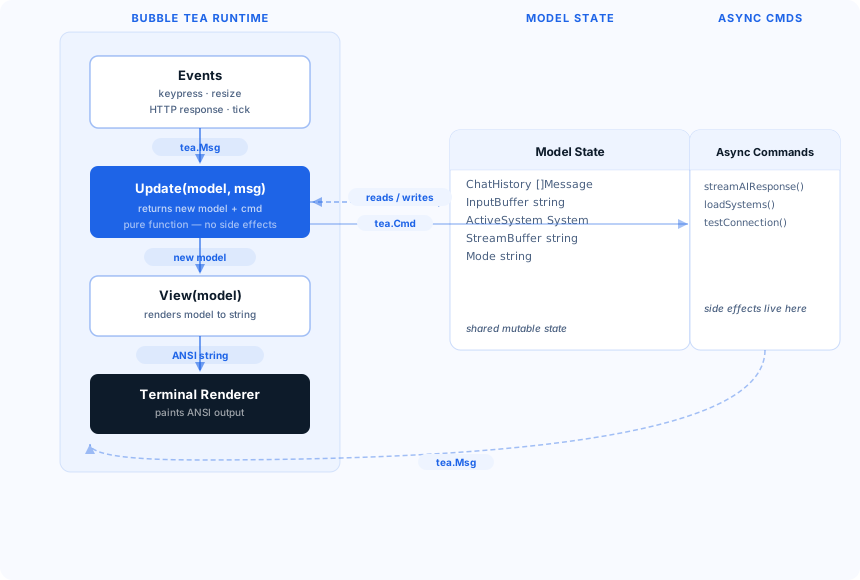
The key insight is that the Update function is pure — it takes the current model and a message, and returns a new model plus an optional command (an async operation). Side effects like HTTP calls and file I/O happen in commands, not in the update function. This makes the state transitions predictable and testable.
How Streaming Works
When the user sends a message, Update returns a streamAIResponse command. That command starts a goroutine that reads from the streaming HTTP response and sends each token as a TokenMsg to the Bubble Tea runtime. The runtime delivers each TokenMsg to Update, which appends the token to model.StreamBuffer and returns. View reads StreamBuffer and renders the partial response. The cycle repeats — approximately 60 times per second at the display tick rate — until a StreamDoneMsg signals completion.
Responsive Layout
The View function queries the terminal dimensions from the model (Bubble Tea delivers tea.WindowSizeMsg events on resize) and computes the column layout accordingly. Lipgloss Width() constraints ensure that the chat panel, status bar, and input bar always fit within the available terminal columns. On terminals narrower than 80 columns, the sidebar collapses.
Offline Capability
The TUI works without a live SAP connection for two categories of tasks:
-
AI chat about code: If you paste ABAP source into the chat (or attach it with
/context), the AI can review, explain, and refactor it without touching SAP. The AI backend is independent of the SAP connection. -
Syntax checking via abaplint: The Go SDK’s
OfflineBackendruns abaplint locally. If you have source loaded,/checkruns a client-side syntax check without SAP.
Features that require an active SAP connection — object browsing, activation, deployment, transport management — will show a connectivity error inline rather than silently failing.
Integration with CLI Commands
The TUI is not a separate binary. It shares the same command registration, configuration, and authentication state as the CLI. When you run abaper system use qas in a shell tab, the TUI in another tab picks up the change on its next system refresh (or immediately when you type /system refresh). Tokens stored at ~/.abaper/tokens.yaml are shared between the CLI and TUI processes.
This also means TUI sessions benefit from the auto-refresh logic: if your OAuth2 access token expires during a long TUI session, the runtime transparently refreshes it in the background without interrupting the chat.
Try It
Install or upgrade ABAPer:
# macOS
brew upgrade --cask abaper

# Linux / other
sh -c "$(curl -fsSL https://raw.githubusercontent.com/bluefunda/abaper/main/install.sh)"
Then launch the TUI:
abaper login   # first time only
abaper         # open the TUI
If you have feedback on the TUI — keyboard shortcuts, layout preferences, features you’d like to see — open an issue at github.com/bluefunda/abaper or reach out on the BlueFunda community Discord.
Ready to transform your SAP experience?
Join thousands of developers using BlueFunda AI tools.