


Phani Puttabakula - May 30, 2026
ABAPer v1.7: Multi-System SAP Management and Object Search from the Terminal
ABAPer v1.7.0 ships two capabilities that ABAP developers have been asking for since the CLI launched: native management of multiple SAP systems and fast object search directly from the terminal. Both features surface in the CLI, the new Bubble Tea TUI, and the Go SDK simultaneously, so however you prefer to work with ABAPer, the upgrade is immediately useful.
This post covers the new commands in depth, shows the multi-system architecture, and walks through a practical object search workflow.
What’s New in v1.7
- Multi-system management: Register, list, switch between, test, and remove SAP system connections with a dedicated
abaper systemsubcommand family. - Object search: Query ABAP objects across your active system by name pattern and type — without opening SE80 or navigating package trees.
- TUI system forms: The Bubble Tea interactive interface (introduced in v1.6.0) gains
/system add,/system list, and/system editcommands so you can manage systems without leaving the TUI. - Apple notarization fix (v1.7.1, same day): Corrected the macOS notarization pipeline so Homebrew and direct downloads are fully notarized on Apple Silicon and Intel Macs.
Multi-System Management
Real ABAP development always touches at least three systems: a development client where you write code, a quality assurance system for testing, and a production landscape. Until v1.7, ABAPer stored a single host/user/password tuple in ~/.abaper/config.yaml and switching systems required editing that file or setting environment variables.
v1.7 replaces that model with a named-system registry.
Registering a System
# Add your development system
abaper system add \
  --host https://dev.sap.company.com \
  -u DEVELOPER \
  -p secret \
  --name dev \
  --client 100

# Add your quality system
abaper system add \
  --host https://qas.sap.company.com \
  -u QASTESTER \
  -p secret \
  --name qas \
  --client 200

# Add production (read-only credentials)
abaper system add \
  --host https://prd.sap.company.com \
  -u VIEWER \
  -p secret \
  --name prd \
  --client 300
The --name flag gives the system a memorable alias. The --client flag sets the SAP client number (the three-digit logon client). Both flags are optional: if you omit --name, ABAPer uses the hostname as the alias; if you omit --client, it defaults to 000.
Viewing and Switching Systems
# List all registered systems
abaper system list

# Output:
# NAME   HOST                               CLIENT  ACTIVE
# dev    https://dev.sap.company.com        100     *
# qas    https://qas.sap.company.com        200
# prd    https://prd.sap.company.com        300

# Switch active system
abaper system use qas

# Verify the switch
abaper system list
# NAME   HOST                               CLIENT  ACTIVE
# dev    https://dev.sap.company.com        100
# qas    https://qas.sap.company.com        200     *
# prd    https://prd.sap.company.com        300
The active system marker (*) shows which system all subsequent generate, deploy, test, search, and list commands will target.
Testing Connectivity
# Ping a specific system
abaper system test dev

# Ping all systems
abaper system test --all
abaper system test issues an ADT discovery request to the SAP backend and reports HTTP status, ADT version, and round-trip latency. It is useful for validating credentials after a password rotation or confirming VPN connectivity before a deployment session.
Removing a System
abaper system remove prdABAPer will prompt for confirmation before removing a registered system. Pass --force to skip the prompt in CI pipelines.
Where Systems Are Stored
All system registrations are persisted to ~/.abaper/systems.json with file permissions set to 0600 (owner read/write only). The format is a JSON array of system objects. Credentials are stored in plain text, so the restrictive permissions are intentional — treat this file like ~/.ssh/id_rsa.
[
  {
    "name": "dev",
    "host": "https://dev.sap.company.com",
    "user": "DEVELOPER",
    "password": "secret",
    "client": "100",
    "active": true
  }
]
If you work on shared development machines or in container-based CI, you can override the active system at runtime with the --system flag available on all commands that contact SAP:
abaper deploy ZMY_PROGRAM --system qasMulti-System Architecture
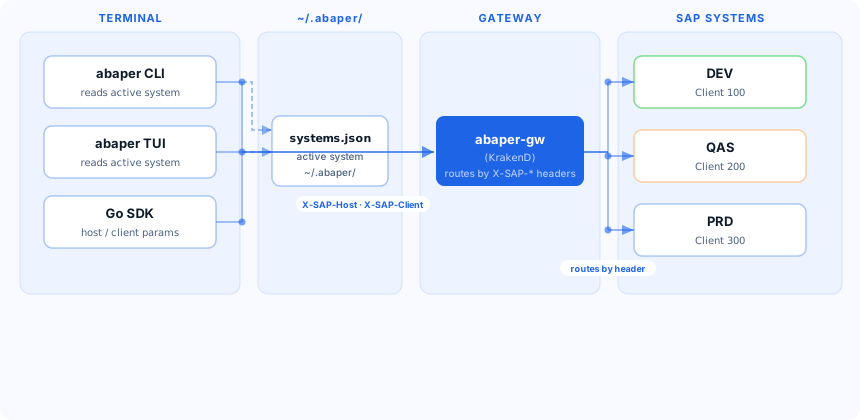
The diagram below shows how the CLI resolves a system at runtime. The gateway layer (abaper-gw) passes system identity via X-SAP-* headers, allowing a single gateway deployment to proxy requests to multiple SAP backends.
Object Search
Object search lets you query your active SAP system’s ABAP repository without a GUI.
Basic Search
# Find all programs starting with Z
abaper search --name "Z*" --type PROG

# Find classes in a specific package
abaper search --name "ZCL_*" --type CLAS --package ZFINANCE

# Find function groups by partial name
abaper search --name "*MATERIAL*" --type FUGR
The --type flag accepts standard ADT object type codes:
| Code | Object Type | Example |
|---|---|---|
PROG |
Program | ZMYREPORT |
CLAS |
Class | ZCL_FINANCE_POSTING |
INTF |
Interface | ZIF_PAYMENT_PROCESSOR |
FUGR |
Function Group | ZMATERIAL_FG |
TABL |
Database Table | MARA |
VIEW |
View | V_MARA |
DTEL |
Data Element | MATNR |
DOMA |
Domain | DOMMATNR |
Search Output
abaper search --name "ZCL_*" --type CLAS

# NAME                  TYPE  PACKAGE          DESCRIPTION
# ZCL_FINANCE_POSTING   CLAS  ZFINANCE         Finance posting handler
# ZCL_MATERIAL_UTILS    CLAS  ZMATERIAL        Material utilities
# ZCL_OUTPUT_CTRL       CLAS  ZOUTPUT          Output controller
Combining Search with Other Commands
Search output is designed to feed directly into other commands. For example, to deploy every program matching a pattern:
# List matching programs and deploy each
abaper search --name "ZREPORT_*" --type PROG --output names | \
  xargs -I{} abaper deploy {}
The --output names flag emits only the object names, one per line, making shell composition straightforward.
TUI System Management
The Bubble Tea TUI launched in v1.6.0 as an interactive terminal environment. v1.7.0 extends it with first-class system management so you can stay inside the TUI for your entire session.
Launching the TUI
# Just run abaper with no subcommand
abaper
The TUI opens with an AI chat interface on the right and a command palette on the left.
System Commands Inside the TUI
From the TUI command input (press / to open the command palette):
| Command | Action |
|---|---|
/system add |
Opens an inline form: host, user, password, name, client |
/system list |
Displays the system registry in a table panel |
/system edit NAME |
Opens the system form pre-populated for editing |
/system use NAME |
Switches the active system; updates the status bar |
/system test NAME |
Runs a connectivity check and reports results inline |
The /system add and /system edit forms use Lipgloss-styled input fields with tab-navigation between fields and real-time validation. You do not need to drop back to a shell to add a new system or rotate credentials.
When you switch the active system with /system use, the TUI status bar immediately reflects the new active system name, and all subsequent AI chat context (including code snippets and object lookups) targets the new system.
Full Release Changelog
v1.7.1 — 2026-05-29
- fix: Wait for Apple notarization to complete before archiving macOS binaries. This resolves Gatekeeper warnings on macOS 13+ for binaries installed via Homebrew or the one-line installer.
v1.7.0 — 2026-05-29
- feat:
abaper system add/list/use/test/remove— multi-SAP system management with named aliases, client numbers, and secure local storage at~/.abaper/systems.json. - feat:
abaper search— object search by name pattern and type against the active SAP system. - feat: TUI
/systemcommand family — system management forms inside the Bubble Tea interactive interface. - feat:
--system NAMEflag on all SAP-targeting commands for per-invocation system override.
v1.6.0 — 2026-05-29
- feat: Bubble Tea TUI — interactive terminal interface launched by running
abaperwith no subcommand. - refactor: SDK reliability improvements; internal ADT client retries and connection pooling.
Install / Upgrade
New Install
macOS (Homebrew)
brew tap bluefunda/tap
brew install --cask abaper
One-liner (macOS/Linux)
sh -c "$(curl -fsSL https://raw.githubusercontent.com/bluefunda/abaper/main/install.sh)"Docker
docker pull ghcr.io/bluefunda/abaper:latest
docker run --rm -it \
  -v ~/.abaper:/root/.abaper \
  ghcr.io/bluefunda/abaper:latest system list
Go
go install github.com/bluefunda/abaper/cmd/abaper@latestUpgrade
# Homebrew
brew upgrade --cask abaper

# One-liner re-run (idempotent)
sh -c "$(curl -fsSL https://raw.githubusercontent.com/bluefunda/abaper/main/install.sh)"
After upgrading, run abaper version to confirm you’re on v1.7.1, then abaper system list to see your existing system registrations — they migrate automatically from the previous single-system config.
Multi-system support and object search are the foundation for the CI/CD workflows and cross-landscape automation we’ll be building on in upcoming releases. If you have a use case you’d like to see — transport promotion, delta deployment, cross-system object comparison — open a discussion on the ABAPer GitHub repository.
Ready to transform your SAP experience?
Join thousands of developers using BlueFunda AI tools.